







encyclobjects: WordPress from zero

Earn 10.00 Reward Points by commenting the blog post
Introduction
encyclobjects: WordPress from zero is a project to spread the word about encyclobjects.com. Building a digital magazine, for a person like me, with limited programming and computer skills, has not been an easy task. For that simple reason, and so that our readers can properly evaluate this magazine, we have recorded a collection of explanatory videos about this website.
Each section of this summary is developed in one or more videos that you can view on our YouTube channel or on our website and, like the rest of the content, you can rate and share. 

Presentation of the encyclobjects project
Although part of the philosophy of the magazine is already explained in: About Us, Idea, Method, Content, in the Project Presentation video, you will be able to see the phrase “the story of a commitment”. This phrase is the beginning of this magazine, and I say the beginning, because one day I committed myself to carry out this project. Although I had no knowledge of WordPress, and only a few basic concepts of HTML5, I decided that I had to try.
Because, you don’t fail when you don’t succeed, but when you don’t try. My commitment was firm and I didn’t consider failure as an option, so in November 2021 I registered the domain encyclobjects.com.

Objective of the documentary
After hours and hours in front of the computer, you discover many things. Every day you go to bed with new knowledge. Some of it, I should have acquired long ago, but it’s never too late. I have watched many tutorials, I have read hundreds of articles, I have worked so much and I have learned so much that, I don’t know how to say it, I want to share this experience.
Share: Said by one person: To make another person share something that is theirs. To have something in common with another. That is the objective of this documentary, to share. To share absolutely everything. To show the details that, sometimes, tutorials ignore, believing that you know the PHP language. To explain why an event is delayed. What do those abbreviations SEO, API, etc. mean? What is a widget, a plugin or a .htaccess file? In this way, by sharing everything I have learned and with your effort, you will be able to do and improve the work that I have done.
One of the important habits (out of necessity) that I have adopted in this project is: looking up what I don’t know, using the RAE Dictionary, Wikipedia, the Bing and Google search engines and asking questions in the support forums. In this way I have managed to work methodically, adding it to my “modus operandi”, so that my basic principles are now as follows: attitude, empathy, method and rigor.
Concept and planning
I knew that the first steps are the most important when starting a project, but I was also aware of my inexperience, so I took precautions and left breadcrumbs so that I could easily retrace my steps, like Tom Thumb. Thus, I designed independent, small compartments, easy to replace or modify. Each idea had its container, a similar idea on the same subject had another container, and so I created many containers.
When I estimated that I had enough containers (I had already thought of everything, or almost everything), I eliminated those that I didn’t need and those that were beyond my capabilities and, with the ones that remained, I established the hierarchies and introduced containers into larger ones, creating a beautiful tree.
Each proposal had its justification, its technical solution, its budgetary impact and its possibilities of implementation and development. Some things I didn’t need (example: live chat), others were too big for me (ex.: dedicated server), I didn’t consider dreams or pipe dreams and, with the little boxes that remained in the tree, I started working.

The idea
It all started with the Orologi (luxury watches) catalogue that I had the chance to look through at the Milan International Furniture Fair. It was 1995 and I was impressed by the quality of the photographs, the type of paper, the description of the watches, the font… It was a display of quality in abundance. It invited contemplation and leisurely reading. I thought: – It is the best product presentation -.
The curious and innovative thing about that wonderful catalogue was the diversity: all the big brands were there! Audemars Piguet, Bulgari, Omega, Piaget, Rolex, etc. coexisted pleasantly in it… With the extraordinary care that the big brands have over the designs of their products! Why on earth does it not matter that an Omega Seamaster is on the left page and a Rolex Submariner on the right? At first I had a hard time understanding the type of business that Orologi magazine was in.
On the plane back to Madrid I understood it. For brands it is not about competition, it is about being in the right place. It is direct advertising, it is aimed exclusively at the sector, it only talks about luxury watches. Do you make luxury watches? – Yes. – Then, this is your place! Very simple, it is about professionalizing publications. This advertising, for brands, is cheaper, more direct and more profitable. For the reader it is ideal, they have before their eyes the best watches on the market with the best information. It is also simple: it facilitates their purchase decision. Everyone wins.
So, I decided to select the selection, make a super catalog of super products and attract readers interested in the best of the best. That is the idea: invest time in improving purchasing decisions, providing professional, reliable information and a direct purchase with the brand. All this, for the reader, with maximum security, technology, editorial solvency and updating. For brands, a professional presentation, a very high subscriber profile and digital marketing in line with their range of products.

The software
Due to my limited programming and IT knowledge, I was looking for simple and open source software, that is, code-free, intuitive, versatile, multipurpose and scalable. The market offers several platforms that meet many of these characteristics, each with its own identity.
To do this, I carefully studied the different software options (SquareSpace, Ghost, Shopify, Weebly, Jimdo, Wix, Joomla, Blogger and, of course, WordPress). I admit that I had a preference for WordPress, but knowing that it has a 40% global share of websites made with this CMS (Content Management System) was decisive. Of course, it is unbeatable in design, customization, updating, features, freedom of movement and it is free! (although not totally).
I also tried to establish essential elements: quality, security, solvency, cleanliness and simplicity. I also prepared different stages (achievable) in which to set objectives.

Audience and potential client
We have to take into account that the action of reading, subscribing or buying is always carried out by people, so our target (objective) is people.
Once the content of the magazine has been defined: accessories, complements and high-value objects, it is a matter of profiling our reader, user and typical client. Affinity with the world of the Internet, email, social networks (Twitter, Facebook, Instagram, Pinterest, YouTube, etc.), subscriptions (newspapers, alarms, professional magazines, private health, newsletters, etc.) and trust in e-commerce is required.
Once the appropriate consultations have been made, the profiles that fit our project are:
– Reader: unisex >30 years old, medium/high income, used to reading.
– User: unisex >30 years old, medium/high income, values information, used to e-commerce.
– Client: Natural person (unisex >30 years old, used to e-commerce, values security). Brand (international, premium and luxury, history, exclusivity, elegance)
This generic information does not define our objective 100%, but it gives us a starting point for its search. Later, Google Analytics and other tools will provide us with information about the profiles of readers, users and customers who visit our website, their interaction and frequency. During the first half of 2023 we have obtained the first data and have configured a basic profile and an editorial offer.
The magazine would be bilingual (initially Spanish and English), and we would consult Google Analytics and other tools to see what type of reader visited our website. During the first half of 2022 we have received data and now, we have confirmed the basic profile and other data to adapt our editorial offer.
Once the editorial offer has been adjusted, our audience, until proven otherwise, remains within the following parameters: unisex >30 years, medium/high income, high cultural level, informed, regular reader, confident buyer of e-commerce. Also, our potential customers maintain the previous profile.
WordPress Configuration 1
Now that we are moving forward with what will be our digital magazine, it is time to start configuring the first tools, especially hosting and WordPress. We will start with a basic configuration that will help us become familiar with both the software and the hosting company and the rest of the main elements.
Although it is a basic configuration and, as we have already anticipated, we have prepared our steps with the possibility of going back, as you will see, some cannot be reversed and, in these cases, we must be extremely careful before accepting the configuration.
Domain and Hosting
Today, for an international website, it is essential to have a .com domain, easily recognizable and valued. The ideal is short words, easy to remember. In the case of our publication, we came up with a conjunction of two words in English (there are no free domains with only one word), easy to remember (encycl-objects), like an encyclopedia of objects.
The hosting we used at the beginning, Ionos (good features and price), helped us to get a feel for WordPress and to have our first “sleepless” nights due to beginner mistakes. I have to say that Ionos has probably the best technical support service in this sector: Extraordinary. Later, once the publication was launched, we needed more features and moved the web space to Siteground, a specialized WordPress hosting with greater capacity, features and services, all at a reasonable price.
The things that are important when selecting a professional WordPress hosting are: Web space (20/40 Gb), number of web visits, automatic WP updates, free SSL, daily backups, CDN, server and object cache, unlimited databases, test space, private DNS. Obviously you also have to consider the price, but believe me, a few more euros per month can mean a lot less problems. 
In the beginning, mainly due to my inexperience, I started hosting with Ionos, a company I already knew and had very good references for in the past. The truth is that they provide a good service and have excellent customer service. I started with them and it was a positive experience. Later, and we will see it in detail, when we entered the world of caching and some errors (which there are) on the advice of the WordPress guru, Fernando Tellado (alma mater of Ayuda WordPress), I migrated the website to Siteground and managed to professionalize my magazine much more as well as making the maintenance task easier.

Installing WordPress
In case you didn’t know, there are 2 types of WordPress: WordPress.com and WordPress.org are relatively the same (technically speaking), but there are differences in management, features, support and costs, which must be evaluated. Briefly:
- WordPress.com is a service that offers managed hosting and a limited version of the WordPress software (less customization and some restrictions), it is a trademark and therefore depends on a for-profit company. It is paid.
- WordPress.org is the open source software that depends on a non-profit Foundation and you can download and install on your own server. It is free and open source and allows you more control and freedom in appearance and functions.
In my case, for economic reasons, I opted for WordPress.org.
Today, all hosting companies offer you “WordPress hosting”, with the WordPress software preinstalled on a server with PHP, SSL certificate, SQL databases and other features for WordPress. This is already an important help since it frees us (almost certainly) from our first problem.

Site Content and Structure
Without departing from the concept: accessories, complements and objects, our editorial content is structured around high-value objects, from highly prestigious brands, of the highest quality and, therefore, for very demanding customers. Watches, pens, bags, shoes, lamps, spare parts, cosmetics, ties, etc… These are the families of objects that will appear in our publication. S.T. Dupont, ACME Studio, Adidas, Omega, Hermès, Gibson, etc… They are examples of brands that fit perfectly into our digital magazine.
An important feature of WordPress is the ability to arrive at a certain content by different paths. This seemed very interesting to me, because not only does it provide agility to queries, but it also allows content to be offered from different points of view. This WordPress feature allows me to maintain the structure of a magazine and, in addition, offer a better and faster localization of content to my users.
Making good articles, useful to our readers is the main objective. To do this, I prepared some categories (few and generic), which would allow me to quickly provide them with content. This way you wouldn’t be penalized too much in SEO at the beginning and you could give a correct and consistent image. With the labels I also prepared something similar, except that these would be more specific.
How An additional part of the content would be products for sale (Woocommerce), with their Product categories and entries. In this aspect, it is very important to SEM (paid marketing) for rapid growth, but since I’m down-to-earth and my budget is tight, I’m only looking at SEO positioning. Still, requiring a little more effort on my part, selling products brings in revenue and also audience.
As icing on the cake, always in search of the Holy Grail, the audience, I would also publish some events related to our activity and also, as projects, some of my experiences.
This way I already have all my content structured:
- Posts: Editorial articles. Categories: Flash News, Current Affairs, Featured, Design, Style, Home, Leisure & Work. More granular grouping tags to make it easier for users to find.
- Products: (Physical) items for sale. Product categories: Accessories, Accessories, Objects, Announcements, News, Best Sellers and Offers. Specific product labels .
- Events: Current events in our field. Event categories: Concert, Sport, Interview, Show, Exhibition, Fair, Webinar. Event tags, shared with input tags.
- Projects: Publication of ideas or projects carried out or in the portfolio. Project categories: Articles, Adusio, Video, etc… Project skills: these are the labels.
- Pages: Spaces where legal, company information, services, forms, and utilities are provided. Structured menus. For me they are very important because they provide information to those who need it instantly.
Well, with all the structured content, all that’s left is to explain the structure of the site (physical location, desktop view):
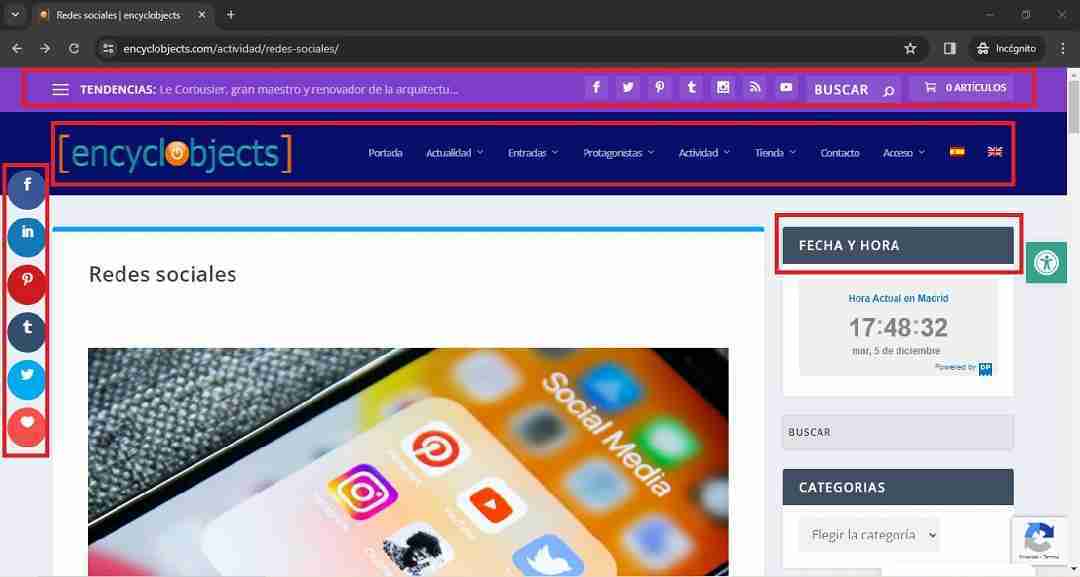
- Header: Horizontal top of the post (Purple): Hamburger Menu, Trending Bar, Social Media Content Icons, Search Engine, Cart. Bottom (Navy): Logo, Main Menu, Language Selector.
- Body: Left: Social Media sharing icons. Center: Content. Right: Sidebar, Service icons.
- Post caption: From left to right: Newsletter Subscription, Company Menu, Customer Zone Menu, Service Icons.
WordPress Configuration 2

Initial Setup
The first day you’re faced with a blank WordPress wall, you’ll never forget it. It’s an electrifying experience (at least, in my case), there are so many things: menus, checkboxes, buttons, drop-down lists, etc…, that you don’t know where to start. I calmed down (I think) and started watching a video on how to install WordPress and how to get started.
I’ve already said that I’ve read a lot, a lot, a lot. Don’t panic, I’ve read so much because I started from scratch, but still, WordPress is quite intuitive and has a lot of interesting helps. I’m sure you’ll have to consult things, but, I assure you, there will always be a wise mind to answer you. One of the most important things WordPress has is the User Community, which is huge, altruistic , and “very nice people.”
There is no one better than WordPress to explain WordPress. So I recommend you start at the beginning and check out support if you’re new to WordPress. You have the essentials in the link above and I recommend that you scrupulously follow the steps to learn and learn well.
Configurations Username (username, e-mail and password), Permalinks (the cascading structure of your website), the Language you want it to be in WordPress presents you with menus, and hundreds of other actions are perfectly explained in the help and support of WordPress. You can also locate, with internet searches, articles or tutorials that help you configure the first settings (e.g.: joseramonbernabeu.com), and later, when the details begin, go to the WordPress “bible”: WordPress Help, Fernando Tellado’s blog that is a reference in what concerns us.
The important thing, and believe me, it’s true, is that you will never be alone. No matter how complicated the issue is, you will always find a helping hand that will help.

Choice of Theme
Earlier I pointed out that a Theme, in WordPress, is a template in which to accommodate the content that you are going to offer to your audience. It’s about presenting in the best possible way the posts, pages, forms, images, typography and the rest of the services that you are going to offer to your readers.
The truth is that it was not difficult for me to choose an option. Having seen the profile of the article to be published, the typical readership, the target brands of the magazine, etc…, I had to focus on “quality”. I needed an elegant, solvent, fast and eminently graphic theme. I’ve been valuing Magazine Pro, Jannah, Foxiz, Newsmag and Extra. One is free, the rest are very well priced and have great website builders (WP Backery, Elementor, BuddyPress, etc…), but as with WordPress, the more than 600,000 installations of Divi (Elegant Themes) made me opt for Extra, its magazine version.
The Divi theme and the Divi Builder are a benchmark in the WordPress market. Fully customizable, with endless modules and technology far ahead of the competition, they are the perfect tool for those who, like me, are just starting out.
That’s why I opted for the Extra theme from Elegant Themes and a collection of plugins to add features to the digital magazine.
The Extra template is simple, elegant and intuitive, designed for newscasts and magazines and presents several types of menus where you can find content.
Extra, in addition, provides a very logical structure for a newscast, contributes Comments, Miscellaneous Menu areas, integrates Bloom and Monarch (Plugins Elegant Themes for Opt-ins and Social Networks), incorporates a module compatible with Woocommerce for e-commerce and very important chapters such as the Divi Builder, the Category Builder, Category Settings optimization, SEO, customization , and compatibility with most WordPress plugins. All this at a very reasonable price, with a very good technical service and constant updates.
Essential Plugins
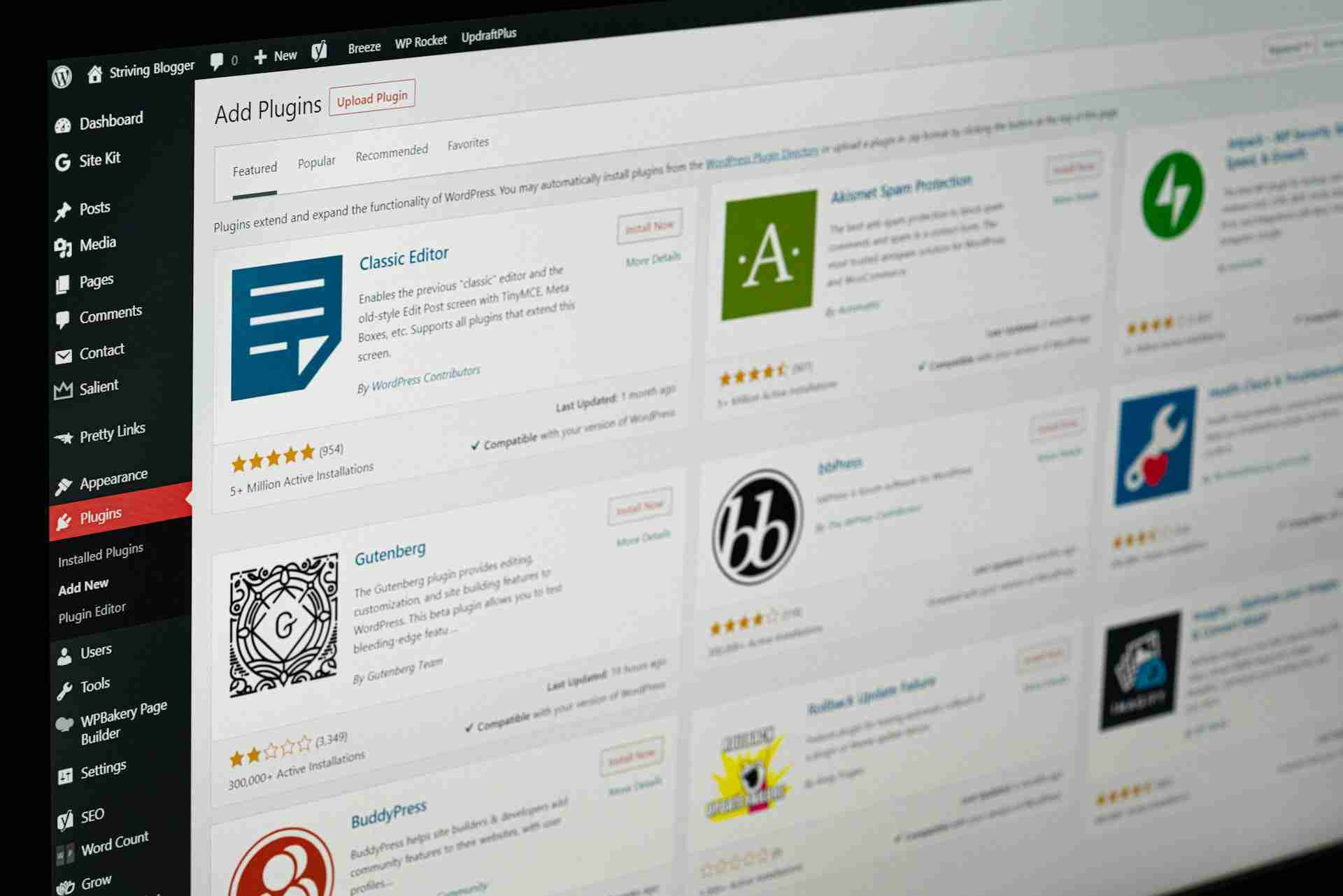
It is necessary, in the basic WordPress setup, to get hold of at least a few plugins to start using your WordPress safely and effectively. I can’t deny that, at the beginning, I was guided by tutorials and articles that recommended this or that plugin. One free, one paid, one for security, one for spam, one for optimization, don’t forget languages, etc…
The fact is that, after a year, today I have 38 plugins in action for the most varied functions. As a general rule, the fewer plugins, the higher the performance, since there is less code to read and execute. However, you will have fewer features and information. It should also be noted that, sometimes, a plugin is installed and activated for a specific need (backup, broken links, etc…) and then deactivated and uninstalled.
I’m going to make a small description of the main ones: (In green the ones that I consider essential plugins, in orange the very interesting plugins to add features, in purple the specific plugins for a single function, in black, the rest.)
- Abandoned Cart Lite for Woocommerce: To find out which carts our users abandon and follow up by email. Free. A must-have in the use of Woocommerce.
- Ad Inserter Pro: I think it’s the best plugin for advertising, technologically super-advanced. Reasonable price. 100% compatible with Google Adsense, Ezoic, etc…
- Advanced Woo Search: Very interesting predictive search engine for Woocommerce. Free.
- Price adjustment: Very interesting plugin by Enrique J. Ros. Super economical. It is used to set the same price in Woocommerce regardless of the country and VAT rate.
- ARMember: Membership plugin with very interesting features, very simple. Economical. It is worth noting the ease of making forms.
- Bloom:If you want to set up engaging opt-in forms in a simple way, there’s no better one. Free with Divi.
- Code Snipets: A simple, clean, and simple way to run code snippets on your site. Free. A must-have when you’re not working with a child theme.
- Complianz: Two extraordinary add-ons (Terms & Conditions and Privacy Suite) to ease the cumbersome task of updating site privacy and cookie banner. Reasonable price.
- Custom Product Tabs for Woocommerce: You can live without it, but if you use Woocommerce, sooner or later you’ll want to add tabs to your product listing. Free.
- Easy Table of Contents: Create an interesting table of contents for your posts. Free. Highly recommended to add a bit of extra SEO to posts.
- Embed Plus YouTube WordPress Plugin: It’s probably not essential, but I’ve noticed better viewing of videos only with the Youtube URL. Free. It requires fine-tuning, take your time.
- Filebird Lite: On a site like encyclobjects with a lot of images, it’s very necessary, since you can organize them into folders for better location. Free.
- Health Check & Troubleshooting: A must. It’s a very useful WordPress tool to use when you have a Site Health issue. Free.
- IndexNow: If you want to automatically index all posts on Bing and Yandex, this is the plugin, from Microsoft Bing. Free.
- Monarch Plugin: A very elegant way to engage your Social Media website. Easy to set up. Free with Divi.
- Nelio Content: An extraordinary discovery. To automatically schedule and share your content on Social Media. Up to 15 profiles. Price to be improved.
- Newsletter, SMTP, Email marketing and Subscribe forms by Brevo: They supported me from the beginning. Lovely people and very professional. Automate your email marketing, Whatsapp, SMS, etc… Up to 300 free daily actions. Ideal to start with and very simple.
- One Click Accessibility: Allows the web to be more accessible (not entirely), both on desktop and in mobile view. It’s a additional benefit. Free.
- PDF Invoices & Packing Slips for WooCommerce: Automatic invoices and packing slips for Woocommerce. Convenient and simple to set up. Free.
- Minimum order in WooCommerce: Another genius from Enrique J. Ros. It seems unbelievable but no, there is no minimum order in Woocommerce. This is solved in one fell swoop. Super economical.
- Rank Math SEO: A must. If you want to be where you need to be, you need this SEO plugin . Very organized and comprehensive. Free. It requires reading the documentation well.
- Rank Math SEO Pro: A must. If you want to be where you need to be and be in front. It’s the most feature-rich plugin of all SEOs. Reasonable price. Drawback: slow down a little bit.
- Security Optimizer: A must-have security plugin. If you want to keep your website secure, keep hackers away by blocking their way, as well as control your activity, this is the perfect plugin. Free. Superb creation of Siteground to sleep peacefully. Super simple to set up.
- Speed Optimizer: A must-have plugin for web optimization and performance. Caching plugin made by Siteground that, in conjunction with the dynamic cache and the Memcached object cache , offers some super interesting features. Free. Best with Siteground hosting. Very simple to set up. It also includes image optimization and CSS and JavaScript treatment.
- Sumo Reward Points: A complete plugin with points and rewards to incentivize your website. Economical. You need to stay on top of updates. Documentation can be improved.
- The Events Calendar: Feature-rich event plugin, it works like a charm. Free. Simple to set up. It has additional modules for tickets, reservations, agenda…
- User Role Editor: User profiles and capabilities. Free.
- Classic Widgets: I got used to dragging and dropping and used it. Now going back to modern widgets would take a lot of work. I’ll leave it as it is. Free.
- Woocommerce: Essential if you want to have an e-commerce with features (some). Better to start with the Fernando: I’llcall you, because the setup takes a long time. Free. There are many extensions to customize it.
- WooCommerce Multilingual & Multicurrency: Together with WPML , they make it easy to correctly translate products and other Woocommerce. Also multi-currency. Free.
- WooCommerce PayPal Payments: To accept PayPal payments on the Woocommerce platform. Very heavy, it slows down and generates some problems. Free. Today, more and more users accept other platforms, so PayPal is no longer essential. In my case, to be extinguished due to its high transaction cost.
- WooPayments: The Woocommerce payments platform.Simple, reliable, and with the addition of Google Pay, Apple Pay , and Stripe. Free.
- WPML Media: The image and media translation section of WPML. If you don’t want to have to duplicate all the images in all languages, use it. Free with WPML.
- WPML Multilingual CMS: The heart of WPML, the best translator for WordPress. If you need a multilingual wordpress, this is the best complement for your translation. Price can be improved. Very good technical service, but it is essential to study the documentation.
- WPML SEO: Another shortcut to not having to manually translate all the SEO components of your WordPress. Free with WPML.
- WPML String Translation: The technical part of WPML, you have to study, but it solves a lot of problems. Free with WPML.
- YITH WooCommerce Wishlist: If you want to have a wishlist in your store, this may be the solution. Basic but reliable. Free.
Design & Customization
The idea that was going around in my head was the magazine Orologi. In that magazine, the protagonist was not the design (by the way, minimal, but super elegant), it was the watches, the images. All the colour, the dynamism, the seduction…, everything was in the images, they were the real protagonists of the magazine. They were images on a blank sheet of paper with clear, professional and suggestive text.
But of course, Orologi only presents watches, encyclobjects.com plays on a bigger field, with more and different objects, more colors, more details, more information and interaction… How to design and present all this content on a continent in an orderly, complete, simple and suggestive way? ¿Simple? I don’t know.
I know that most things are already made up, so observation was my best alternative, so I started snooping through publications (on paper and on the internet) and came to a conclusion that confirmed my suspicions. If the protagonist is the product, the image, the news, let’s leave it all the prominence and only highlight our logo as a brand image.
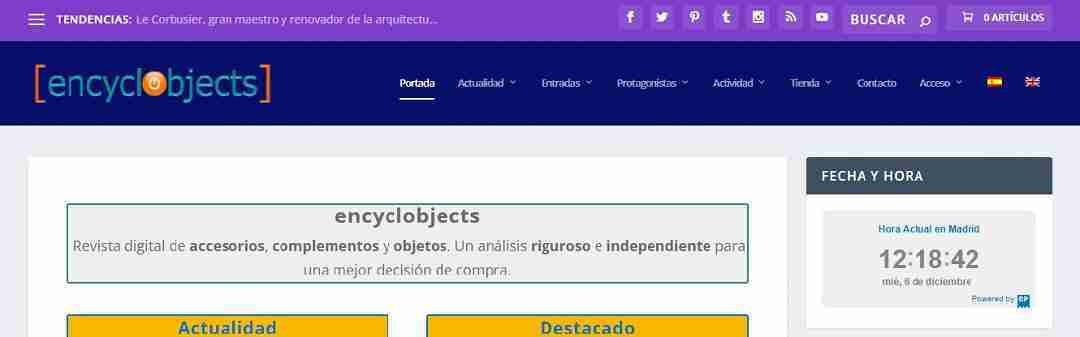
Logo & Color Palette
Encyclobjects is a made-up acronym. The RAE Dictionary defines acronym: 2. m. A word formed by the union of elements of two or more words, constituted by the beginning of the first and the end of the last, or frequently, by other combinations. The fact is that it “sounds” like an encyclopedia of objects, which is exactly what you want to convey. What happens, which in the end, is “what happens to me”, is that I like complications and, in English, it seemed more international to me.
As the domain is encyclobjects.com, for the logo I thought it was appropriate to continue with the name encyclobjects, since it is, first, about ratifying the acronym (encyclopedia of objects), and second, making encyclobjects sound like a short and easy to remember word with the sum of words encyclopedia + objects. This way I avoided searching for an object, or other image/shape/icon that evoked an encyclopedia of objects.
The nexus, the o, divides the acronym into 2 parts with the same number of letters (encycl or bjects), curious isn’t it? For the logo I would have to look for something unique for that letter “o”. At first I thought of [encyclorbjects], and then searching, searching… (logically in royalty-free images), I found an orange billiard ball with a power symbol on it. With a few tweaks I put it in the center, a little bigger “et voilà”, the logo created.
For the Favicon (thumbnail of the logo that appears in browser tabs), I removed the text leaving only the brackets that wrap around the billiard ball with the power symbol. In this way, the digital nature of the magazine was further emphasized.
With the logo already designed, I decided on a more intense color palette for the header, very marked by the navy blue color that would be the background of the main menu and the logo. And another basically neutral color palette for content, menus, and statements. This second palette has had very slight modifications (some transparencies) compared to the one that comes standard in Extra (it is very difficult to improve the unbeatable).
Here is the coding of the color palettes:
– Header: Purple: rgba(92,6,186,0.76), Navy blue: #070f6b, orange Logo: #fe702e, Orange Submenu: rgba(247,131,0,0.93), Green Logo: #2a8e7a, White Text & Menus: rgba(255,255,255,0,6), White Link Text & Menus: #ffffff
– Content: Background: rgba(201,192,237,0), Fixed navigation text: rgba(255,255,255,0.6), Fixed navigation link: #ffffff, Fixed navigation background: #3e5062, Text: rgba(5,5,5,0.6), Text link: rgba(239,83,4,0.78), Header text: rgba(0,0,0,0.75), Accent color: #00a8ff
Footer: Text: rgba (255,255,255,0.6), Header text: rgba(255,255,255,0.6), Text link: #ffffff, bottom bar background: rgba(0,0,0,0.3).
Theme Customization
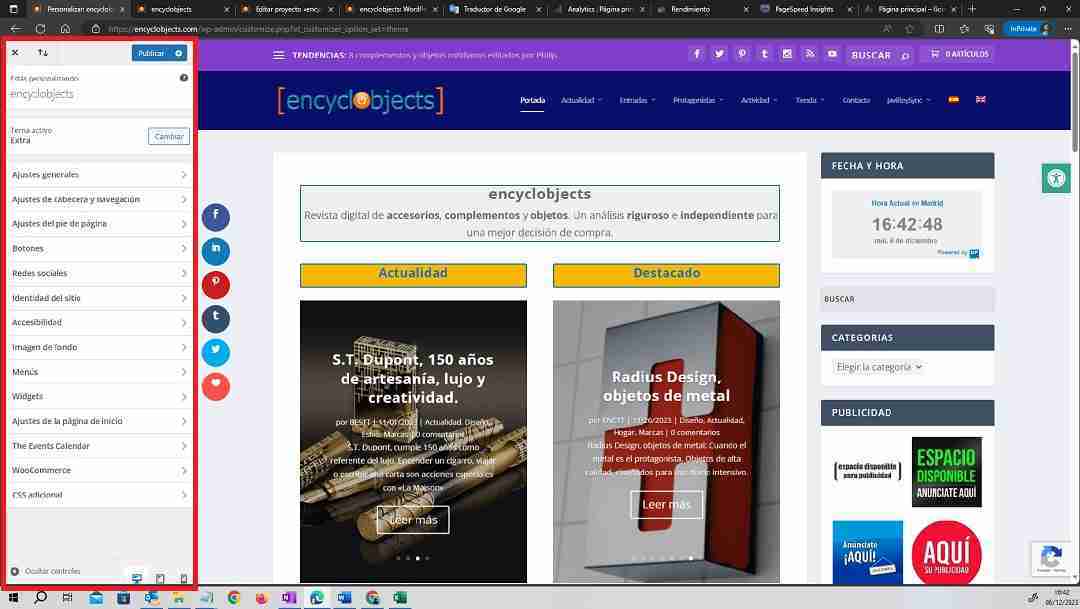
Extra, by Elegant Themes, is a 100% customizable template. In the WordPress menu is located the basic menu of Extra, in it is the Theme Customizer. In full screen, the home page and the customizer menu will appear on the left. The adjustments you make will appear immediately on the selected page, making it easier to check the result of the adjustment. If the setting is correct, you can save it with the Publish button.
In addition, at the bottom of the menu we have 3 types of visualization: desktop, tablet and mobile. You can also hide the menu to see your website in full screen. All the adjustments we can make are ordered as follows:
– General Settings: Layout, Typography, Background Settings.
– Header & Navigation Settings: Header Format, Main Menu Bar, Secondary Menu Bar, Fixed Navigation Settings, Header Element Settings.
– Footer settings: Layout, Typography, Footer elements, Bottom bar.
– Buttons: Button styles, Button styles on hover.
– Social networks: Inclusion of the URLs of each incorporated social network.
– Site Identity: Site Title, Tagline, and Icon (Favicon)
– Accessibility (Optional): One Click Accessibility icon settings and styles
– Background image: If you want a background image you can place it, resize, etc…
– Menus: You can set up and manage menus in 3 locations, display menus in 3 locations, and you can set up multiple menus.
– Widgets: Depending on the columns in the footer and whether or not you choose sidebars, you can set up different widgets in various locations.
– Homepage settings: Latest posts, static page, or Extra layout. For entry, you can select a page.
– The Events Calendar (Optional): Settings for the different views of events, their categories, and the calendar.
– Woocommerce (Optional): Once you install the Woocommerce plugin, you can customize some Woocommerce features to include with the Extra design.
– Additional CSS: In addition to Extra’s own settings, you’ll be able to add styles of your own by adding additional CSS to the theme.
This is the visual part of customizing the Elegant Themes Extra theme, but you haven’t stopped fully customizing and tweaking the theme. To set up Extra well, it is essential to follow the documentation provided by Elegant Themes.
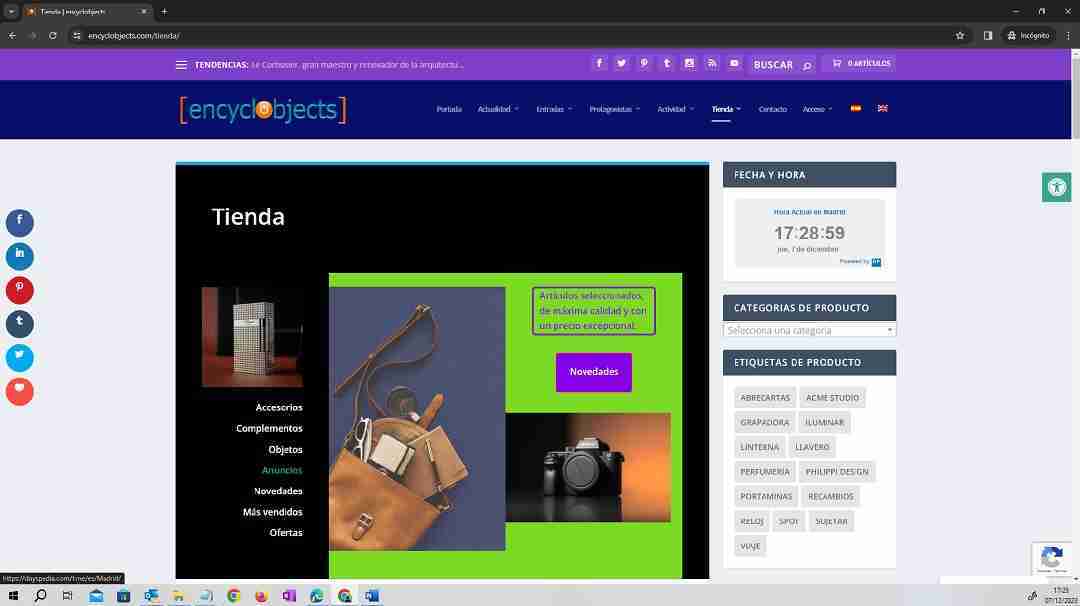
Creation of pages, entries and menus.
For WordPress, everything is posts, and although it establishes differences between posts, pages, events and projects, at the engine level, they are the same. On the other hand, and to get fully into the subject, one of the features of WordPress is the possibility to get to a site by different paths. All in search of navigation and to make the visit of users more attractive . In the case of encyclobjects.com, the structure of pages and menus has been made as follows:
– Pages: Spaces dedicated to: Home page, legal information, company information, interaction (forms), e-commerce (products), navigation, services, utilities and landing.
- Homepage: Front page.
- Legal Information: Legal Notice, Terms & Conditions, Privacy (EU), Privacy (UK), Cookie Policy (EU), Cookie Policy (UK), Liability.
- Company Information: About Us, Idea , Method, Content, Quality Policy, Posts, Protagonists, Authors, Events, Projects, Activity, Affiliation, Testbed, e-commerce, Email marketing, Advertising, Social Networks.
- Interaction: Contact, Login, User Registration, Profile, Change Password, Lost Password.
- e-commerce: Store (product pages), My account, Wishlist, Cart, Checkout.
- Navigation: Site map.
- Services: Subscription Plans, Points Program, Shipping, Returns & Refunds.
- Utilities: Frequently Asked Questions, Links, Utility Files
- Landing pages: Welcome to the newsletter
– Tickets: Spaces for publications: Articles with images and text, Podcasts and Videos. They are always placed in containers, for example a page, a category, a tag, or a selection, etc…)
– Events: Spaces intended for the presentation and promotion of events. They place either in the Events Calendar (Events page), in a selection of dates, in a category , or in a tag.
– Products: These are spaces that present a file of an item for sale, either directly or by affiliation. They are located on the Store page, in product categories, or in product tags. They also appear on search pages.
– Projects: Spaces for the presentation of projects. They place well in categories or project skills .
As you can see, a site with the characteristics of encyclobjects.com requires many pages, and ordering them well is essential to facilitate a smooth and easy navigation for our users. To offer a good navigation, we have prepared 4 menus that we have located in 5 areas and we detail them as follows:
- Main menu: Located in the header with the Navy blue background.
- Secondary menu: Located in the header (Hamburger Menu) with the Violet background. Second location in footer with the name Company.
- Footer Menu: Located below the Marengo Grey background footer.
- Customer Area Menu: Located in the footer with the name Customer Zone.
An important detail to point out is, and always has to be a goal for any content creator, is to continuously suggest our users to log in every time they visit our communication spaces. In the case of encyclobjects.com, in addition to earning reward points, interaction saves time and improves the browsing experience. Now, how does a user know they’re logged in? In our case, we have used code so that, once the user is connected, the word Access in the main menu is transformed into their username.
Divi Builder
WordPress has a before and after Divi Builder, the most used visual builder in the creation and design of web spaces. If, from the beginning, WordPress was a software that could be used by people without programming knowledge, since the emergence of Divi templates , and the subsequent presentation of the Divi Builder, designing web pages with WordPress is even easier.
Divi Builder is here to help. It can be used to further customize the Extra template (or any other Divi template), and turn a web space into anything imaginable without any programming knowledge!
WordPress content using Divi Builder is structured into sections, rows, and modules.
- Sections: in Blue, they contain a complete unit (page, entry, etc…) or a partial unit. They have individual settings (content, layout, and advanced) and contain rows.
- Rows: in Green, horizontal, they can contain 1,2,3, 4 or more columns, of the same size or different. It also has individual settings (content, layout and advanced) and, in turn, each column can contain one or more modules, which are the tools that contain the functions.
- Modules: in Charcoal Grey: These are the functional containers where the contents are located. There are modules (Short Announcement, Audio, Button, Search Engine, Carousel, Gallery, Image, Menu, Subscription, Text, Video, etc… up to more than 40 functionalities) There are also Woocommerce modules. Each module has its own individual settings (content, design and advanced)
Sections, rows, and modules all have editing tools that allow you to save to the library, copy, paste, deactivate, and even generate content using artificial intelligence. These features allow us to save a lot of time on repetition tasks.
Due to its enormous design, adjustment, and editing possibilities, it is convenient to study the Divi Builder documentation and even view tutorials. Learning is fast, as it is a very intuitive tool and combined with the visual nature of its application, the first results are obtained quickly.
Extra, the Elegant Themes magazine template also has a Category Builder, smaller than Divi Builder but very practical to quickly configure and design the categories of your WordPress.

Content Creation
Creating good and original content, that is the goal of every publication. In our case, we publish a digital magazine, even more so, since the internet is a world without barriers and robots (bots) detect at the minimum any copying, plagiarism or simulation that is intended to be carried out. That is why, for us, too, original content is simply : the goal.
There are other factors that influence us when it comes to maintaining this premise, such as: our own satisfaction and the audience. I really like it when a reader leaves a positive comment on one of my articles, and I guess readers also like to read (or view) good content, therefore, we are in the same boat.
Editorial content
Creating good original content isn’t that simple. It requires prior work of searching for topics, inclusion in an editorial calendar, gathering information, writing the article, rating the editor, scheduling, publishing, content marketing, and monitoring the publication.
We follow all these stages step by step, and we do it as follows:
– Topic search. We limit our content to the world of accessories, complements and objects, and within this world, we refer to high-value products (not only economical, e.g.: a Zippo lighter is not excessively expensive, but it is excellent), and to highly prestigious brands. In the first stage (where we are now), the search for topics is selective, looking for impact brands, although not the most well-known, to provoke a certain curiosity. Later, we will alternate the contents to fill each of the containers of our publication.
– Editorial calendar. Our editorial calendar is the Newsletter. On a monthly basis, our newsletter presents new content every first of the month. We usually work a couple of months in advance, but it is not always possible to keep up the pace and it is necessary to readjust it for an article that is delayed (On these occasions, it is possible to hear a word louder than usual in the Editor’s office).
– Permissions: We usually request permission, when we decide to start an article, from the owners of the sites from which we intend to obtain the information. Both images and texts can be protected by copyright and we must not violate those rights. Therefore, we always advise you to request authorization for the use of content that is not from our domain. In the vast majority of cases, we have always been given permission to use content.
– Collection of information. The author in charge of writing (or recording) the article collects information about it, whether audiovisual, graphic or written. This information is stored in the assigned folders and in the defined formats (jpg, png, webp, docx, etc…).
– Preparation of the article. With the archived media that the author deems appropriate, he begins to write or record the article. Each time you use a medium, you record it in the Bibliography and media box. Media that is not used is deleted. The content is included in the post, the media is added ( Filebird Lite plugin, Youtube), translated (WPML) and formatted. It is saved and as appropriate, scheduled or reprogrammed.
– Editor’s assessment. The Editor is the editorial manager of the publication and is responsible for evaluating the publication and suggesting changes or not, in accordance with the editorial line.
– Programming. If the Publisher has given its approval, the publication is scheduled or reprogrammed definitively , adding it to the corresponding Newsletter .
– Content marketing. In addition to the publication in our Newsletter and its dissemination by e-mail (Brevo Plugin), it is also published and disseminated on Social Networks such as XTwitter, Facebook, LinkedIn, Pinterest, Tumblr, Instagram, RSS and Youtube (via Nelio Content). In addition, sampling can be carried out by Whatsapp.
– Follow-up of the publication. The Brevo plugin provides us with valuable statistics about the sending, opening, clicks and activity of our Newsletters. Also, the Social Networks in which we publish content provide us with information about the activity. This information is unified in the Nelio Content plugin. The Monarch plugin does not give an overview of social media tracking.

Search Engine Optimization (SEO)
WordPress is a content management system (CMS) and on its own, it allows you to add meta descriptions, titles, headings, alt text, tags, custom URLs, and other SEO-friendly tools. If you know SEO basics, have up-to-date information about the search algorithms used by Google, Bing and Yandex and have plenty of time, you can perform all the SEO actions of your website, without plugins (plugins), in search of “organic” positioning. And you might get good results.
Not me. I don’t have extensive knowledge of SEO, nor am I up to date with algorithms, nor do I have all the time in the world to dedicate exclusively to encyclobjects.com SEO. That’s why, in the first instance, I relied on the “WordPress SEO reference”: Yoast SEO. And I started with it, but it was very complicated.
Have you ever wondered why WordPress has so many boxes and options? I do, and on one occasion I asked this question to a technician who, surprisingly, answered: – I don’t know, but surely so that they are filled out or not and they choose one thing or another. Hahahahahahahahaha… But since I’m so stupid!
When someone, who knows what they are doing, puts a checkbox , it is for it to be verified or not, and if it contemplates options, it is simply for you to choose one. From that moment on, I devoted a lot more attention to my WordPress and its damn boxes and options.
This is what happens with SEO, to do good SEO you have to be super methodical and fill in all the boxes, or not, and choose one of the options (yes or yes). That’s why I needed to change plugins, because until I figured out what the hell that box was doing, it took an afternoon. All for not putting a link with a question mark next to it!
Weeks later, due to a query I made to Elegant Themes, I was recommended to try Rank Math SEO. And I did. What I liked the most was that, being free, everything was very tidy and all the queries (although in English) were at hand, with a very complete documentation ( the Rank Math videos are great). Installation was simple and, using the wizard, it was set up very quickly.
I soon discovered the Monitor 404 and my nightmares would begin. Although then I hatched it and started to perform Redirects and it was improving little by little. So much so that I quickly raised my ranking and everything started to make sense. The improvement was further increased when I upgraded the plugin to the Pro version, as I could fine-tune the posts more.
In general, Rank Math Pro is a very complete plugin, it acts on all the SEO chapters you need to consider. Its main qualities and settings are (in green the ones we have activated):
– Desktop: It is very complete and, in the first place, it presents all the modules that you can activate: Monitor 404, ACF, AMP, Analytics, bbPress, BuddyPress, Content AI, Image SEO, Instant Indexing, Link Counter, Local SEO, News Sitemap, Podcast, Redirects, Schema (structured data), Profile Manager, SEO Analyzer, Sitemap, Video Sitemap, Google Web Stories, Woocommerce.
You have a Help tab that will help you set up Rank Math, import data, and improve your SEO score. You also have the support with Online Documentation, Ticket Support and if you want, Affiliate Program. Another interesting part is the Configuration Wizard (follow it) and Import and Export (Very handy when installing the plugin elsewhere and taking the settings with you).
– Content AI: Paid extension although they grant you free credits every month. We only use it for keywords. At the moment, we don’t use it in content creation, first, waiting to know how Google is going to penalize websites where it detects content with AI, and second, we like original content better.
– Analytics: You need to connect Rank Math with Google Analytics. The information it provides is impressive: Dashboard (very comprehensive), Site Analytics, SEO Performance, Keywords, Score Tracking , and Indexing Status.
– General Settings: Links, Breadcrumbs, Images, Webmaster Tools, Robots.txt, Other, Blocks, Woocommerce, .htaccess, 404 Monitor, Redirects, Analytics, AI Content.
– Titles and Goal: Global Goal, Local SEO, Social Goal, Homepage, Authors, Other Pages.
– Sitemap settings: General, html map, Content types, Taxonomies, Special maps.
– Instant Indexing: Instant URL submission to Bing Webmasters Tools and Yandex, Settings, History.
– Schema templates: To create special templates.
– Profile manager: To give permission to other users and manage SEO.
– 404 Monitor: Very important, it helps to detect errors.
– Redirects: Troubleshooting URLs that cause errors.
– SEO analyzer: It analyzes the complete state of SEO in one fell swoop, it also gives you information about the competition.
– Status and tools: You have to check from time to time to find out if everything is going well. Important for database control, you can purge the analytic cache, recalculate data and scores, and delete and flush records.
– Help and support: One word: Awesome.

Categories and tags
Categories and labels, generically taxonomies (RAE Dictionary: 2.f. classification, the action of classifying), are used in WordPress to structure posts (articles). Just like a library categorizes its books into topics, countries, reading type, or language or authors, WordPress structures content into categories and tags. They are very important for users as they will make it easier to search for content. They are also important for SEO, as they will allow search engines to “understand” the structure of the site and the localization of the content.
– Categories can be hierarchical, i.e. you can create categories that are integrated into a higher category (e.g. Superior category: Sports; Subcategories: Football, Tennis, Athletics, etc…). In principle, it is better not to create many, since if you do not have much content it is not positive to have categories without content. Our magazine, encyclobjects.com, has the following categories: News, Design, Style, Home, Brands, Flash News, Leisure, People, Reports and Work. I have designed broad, generic and stable categories over time, because they are the basic structure of the magazine. I will consider adding subcategories later.
The News category is a “passing” category, where posts enter your publication and leave the category after a while, thus showing in “News” the really recent publications. The Brands and People categories are located in the Protagonists container, while the rest of the categories, except News, are located in Tickets. For a simpler and more graphical location of the categories I have created a Categories page, within the Taxonomies tab of the Posts menu. Also, in the sidebar there is a drop-down widget with all the categories and the number of posts they contain.
At the SEO level, some advise not to include an entry in several categories (it is more of a warning to navigators to avoid mistakes that can affect search engines). Our posts, from the first moment, belong to at least 2 categories (one: Current affairs, a second theme and even a third subsidiary). Our idea is, until we have a large number of entries, to always show the containers full, to count, from the outset, with the indexing of all the categories.
– The tags are located on the Posts page, within the Taxonomies sub-tab, on a page that keeps them sorted alphabetically. Tags allow you to identify the content in a more precise way (if a category is style, a tag can be ties or sunglasses), therefore, by indexing them, we can have presence options not only by the meta title and the keywords of the posts, but also by the tags where we have included them.
The labels are not hierarchical. They are dynamic, anarchic, and even rebellious. You can assign an entry to 3, 4, 5 or more tags, it all depends on the reach you want to achieve. You don’t want to have empty labels. Like categories, tags must contain sufficient content.
You also have a tag widget with an image that links directly to the tag page.

Multimedia integration (images, videos, etc.)
In order for our publications to be attractive to the user, it is necessary to provide them with appropriate multimedia content that reinforces our editorial line. Although we consider the didactic and informative nature of our publications to be of vital importance, it is no less true that we take care of the multimedia content of our publications. And it is not easy, since, sometimes, it requires arduous research to transmit, in a graphic way, the written content.
The localization of images and videos can be achieved through: free or paid image banks (free: Unsplash, Freepixel, etc…), image searches with a Creative Commons License (with attribution), own production (the images we make ourselves) and with original content (prior authorization on websites or digital platforms).
In any case, it is advisable to provide a visible image caption and title in each inserted media to comply, firstly, with the attribution of the medium, and secondly, to provide truthful information to the reader, which is always appreciated. It is also advisable to maintain a balance between text and multimedia content, since, for example, an article with too much text can seem tedious, so alternating images will give it a faster pace to read. Also, an article full of images can make the written content minimal, and therefore, disposable.
The images and documents that use the posts must be included in our WordPress media library, where we will organize them into folders (Filebird) for quick location. It is better to upload the optimized material, both in size and quality, although there are plugins that optimize the images and convert them into lightweight formats for a better optimization of our website (Imagify, Siteground Speed Optimizer and others).
In the case of images that can be enlarged to better visualize some detail, it is advisable to use the “light box” image box to enlarge the image in the same place.
Videos have another treatment, since, due to their size, it is not advisable to store them in the WordPress media library, so we will embed them in our posts using their Youtube or Vimeo embed code. Videos that are produced in-house should also be published on YouTube and also used with their embed code.
Finally, we must also consider the graphic impact of our advertising content, which can affect the display of our posts and sometimes distract the attention of our readers. It is necessary to design and define the ideal areas for the insertion of advertisements.

Interactivity and advanced features
The important thing for a digital publication of our kind is the audience. Achieving a high level of audience is essential to meet the economic and editorial objectives of a publication. However, above all, and in our case, we also need a participatory audience. That is, readers willing to comment on articles, to collaborate in the publication’s initiatives and in the development of a fundamentally informative journal.
An interactive audience, eager to participate in this project and with enough concerns to ascend to a higher level of publication. To achieve this type of audience, we have equipped our website with advanced functions, which not only allow our readers to interact, but also provide added value to the publication itself, providing increasingly fast, reliable and interesting information.

Forms
A simple and intuitive way to connect with our publication is forms. With them we intend that our readers, through user registration, access the content of our publication and, likewise, obtain advantages over any other unregistered user. The forms we feature in our publication are:
– Contact Form: the easiest way to contact us and make any queries or suggestions. Fast and efficient.
– User Registration Form: the gateway to our publication. By registering as a user you will get access to the first subscription level (Free), which will allow you to access our Points Program. From time to time we establish special promotions for our registered users. Don’t miss them.
– Login Form: Most of the applications we use on the internet require login. This is very important since the login process undoubtedly allows the user to be accredited with respect to the application, allowing him to access all the headings that are intended for this status. In addition, in our magazine, this action is rewarded, since we reward the login with points (once a day). With these points, as a reward for loyalty, you can then redeem them in our online store.
– Form Customer Registration: Allows you to register as a customer with your email and join the points program. Also, if you want, we will send you reward points for your birthday. You will also be able to access all the details of your account: orders, points, etc., and also set Wish Lists.
– Subscription Plans Form: You are already a user, therefore, you can take advantage of our paid subscription plans: START, AVANT and SELECT, with which, for a small amount you will enjoy exclusive content and you will be able to multiply your points by 2, 1.5 and 2.5 respectively.
– Newsletter subscription form: In the sidebar of our pages, posts and projects you have a widget where you can subscribe to our newsletter. You will first receive an email to confirm your subscription and confirm the language in which you wish to receive the newsletter. Then, you will receive an email the first of each month with the content published and what is going to be published soon. You also have the widget in the footer. And, as if that were not enough, from time to time, it can emerge on any of the screens. Take advantage of it to stay up to date with the content of our publication.

Audience Engagement
Our audience is invited to participate in our magazine, and they can do so in different ways:
– Posts rating: You can leave us 5 ***** at the end of each post.
– Comments on Posts: You can make a comment at the end of each post. In it you can rate the article, make a query or suggestion. Remember that all comments will be moderated by our team to always maintain a good tone in our publication. Plus, if you’re logged in, you’ll be able to earn reward points.
– Comments on Events: In the same way as on the tickets, you can leave a comment in the box at the end of each Event, indicating if you have seen it, if you liked it or anything you think may be interesting for other readers. You’ll also get reward points.
– Like: You can anonymously add a like (red heart) on the left side of each post.
– Product Reviews: If you have purchased a product in our online store, you can leave a rating of it which, like all comments, must be approved by our team. In addition, you will get reward points for this action, which will be added to the points you have already earned for each € purchased.
– Point promotions: We periodically carry out reward point promotions, which multiply by 2 or 3 the number of points assigned for each action. Remember that if you have a subscription plan other than the Free Plan, you can multiply your reward points in addition to the promotion. Take advantage of them, check the sales calendar and points promotions.

Photo by NordWood Themes on Unsplash
Social Media Implementation
We periodically publish our content on Social Networks. This is an action that, due to its high incidence of resources, we carry out automatically using the Nelio Content plugin. We are currently present on the following Social Networks:
– Facebook: https://www.facebook.com/encyclobjects
– X (formerly Twitter): https://x.com/encyclobjects
– Pinterest: https://es.pinterest.com/encyclobjects_esp/
– Tumblr: https://www.tumblr.com/encyclobjects
– Instagram: https://www.instagram.com/encyclobjects/
– RSS: https://encyclobjects.com/feed
– Youtube: https://www.youtube.com/channel/UCw5ptXMdfm1W__EYvdjPIVw
You can access each of our Social Networks through the corresponding icon that remains at the top of our publication. You can also share any Social Network post you want at the beginning of each post, event, or project.
You can also share the entire page in the vertical icon list that appears on the left of each page. You can also follow us on each Social Network using the set of icons that appears in the “Follow Us” widget in the right sidebar of our post.
Any action you take on Social Networks supporting or disseminating our publication will be very well received.
Widget Usage and Areas
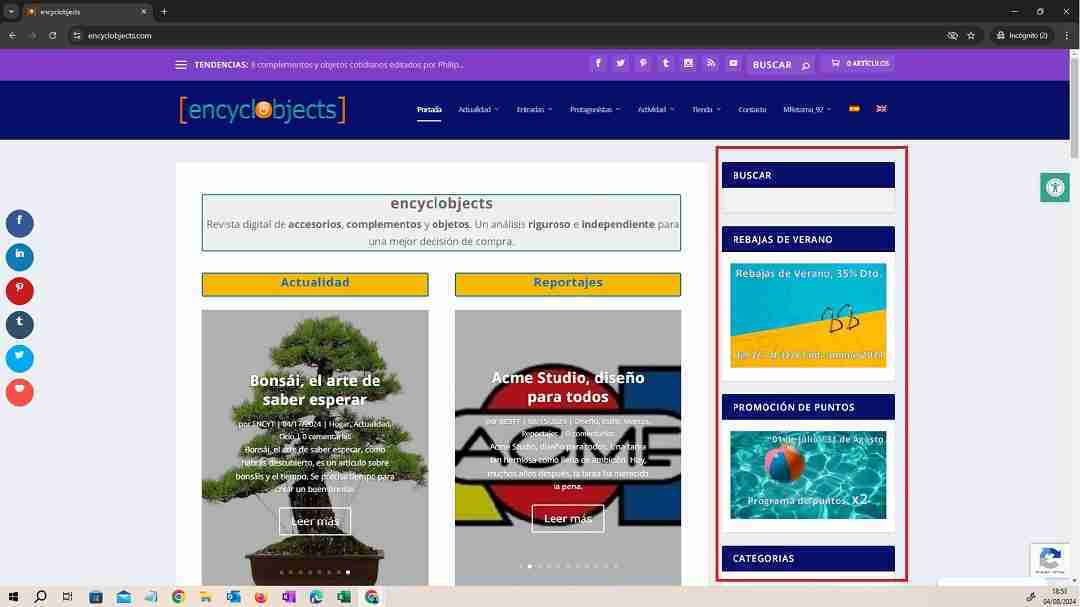
An important chapter within a publication such as a digital magazine is the user experience. In search of the audience and participation, it is the responsibility of the digital magazine to favor the user experience. To do this, we incorporated a side area (sidebar), where we implemented a series of widgets that will facilitate both navigation and user participation in the magazine.
This sidebar is present on all information pages, posts, projects, categories, and tags, below the header and on the right side of the page. It contains the following elements or widgets:
– Search: A predictive search engine that makes it easier for our users to locate the content of their interest.
– Self-promotion widgets: Spaces that inform our users of our promotions and advantages throughout the year. For example: Summer Sale, Points Promotion.
– Categories: A drop-down box that informs about all the categories in our publication and presents, in parentheses, the number of entries that each category has.
– Advertising: A space for the insertion of advertising banners.
– Recent Posts: A widget that features the last 5 posts published along with a thumbnail image.
– Newsletter subscription: Widget that presents the subscription form to our Newsletter.
– Tags: We include a box with an image that leads directly to the tags page, where our users, alphabetically, can search for content in any of our tags.
– Advertising self-promotion widget: This widget suggests to our target brands, to advertise in our digital magazine.
– Products: A widget that features the last 5 published products along with a thumbnail image
– Follow us: A space that informs the number of followers by Social Network and facilitates their follow-up.

Security and Maintenance
If we look at the passage of time, every day, people and companies dedicate more resources to safety and security. This is true in all areas of life.
Personally, we have insurance for our house, our car, our dog, our health, etc… Professionally, controls and processes are also carried out to obtain correct levels of safety and maintenance of the facilities for their optimization over time.
This set of actions and measures must also be carried out in our WordPress. We need security on our website, to protect it from hacker attacks, malicious software and annoying spam. We must also provide security and confidence to our users, updating and optimizing our website, both in its loading times and in the features and interaction options.
In short, good risk management is important. This is what we are going to talk about in this chapter.

Security strategies
To carry out proper risk management in our WordPress, we first need to evaluate the risks that we may encounter and, subsequently, protect our website with the appropriate tools. That is, carry out a security strategy. Do it, the sooner the better. You will not regret it and you will work more calmly.
When I started the project I installed a security plugin (Sucuri), a plugin to control brute force attacks and logs (Limit Login Attemps Reloaded), another plugin to control spam (Akismet) and, in addition, I had the security tools that my previous hosting (Ionos) gave me. Too many tools (some of them very complex) and too much work.
I needed to simplify.
Everything changed with hosting on Siteground and installing their Security Optimizer plugin, an extraordinary all-in-one security plugin that’s easy to set up and a full-time worker.
For spam I activated Google reCAPTCHA v3, which is the one that causes the least inconvenience to the user.
With these 2 tools I solved the security of my WordPress, and I started working with more peace of mind.
Specifically, although it is impossible to have zero risk, it is possible to have good tools to make it very difficult for the “bad guys”. Let’s see how these tools work:
On the part of the Security Optimizer plugin, we control the following aspects:
– Site Security: Protects system folders . Hide the WordPress version. Turn off the theme and plugin editor . Disable the XML-RPC file. You can disable RSS and ATOM feeds (in our case we enable them to favor users who follow us via RSS) Enable advanced XSS protection . Delete the Readme.html file by default.
– Access security: Custom access URL . Login access limit (of URLs suspected of brute force attack). Identification of 2 access factors for administrators and editors. Deactivation of “common” usernames. Limitation of the number of access attempts (in our case, 3).
– Activity log: At all times we will have a record of the IP addresses that visit our website (type of visitor, IP, page visited and server response). We will be able to block the IP or see its activity. We can also order the registration by registration IP, by blocked accesses, obtain weekly reports and receive the activity log by e-mail.
– Actions of a hacking action: We will be able to reinstall all the “free” plugins , force the password reset to the users and disconnect all the users.
On the part of Siteground hosting (GoGeek) we have the following tools:
– Backup: Daily (possibility to restore files, database and e-mails). Create backup (always keeping 5 active), restore and download.
– SSL Manager: for each domain with Let’s Encrypt Wildcard
– Force HTTPs: for all domains, presenting all our pages securely.
– Protected URLs: If we wish, we can include URLs that are specially protected to prevent access to any user.
– Blocked traffic: We can block IP addresses or all IP addresses from any country.
– Site Scanner: Siteground’s optional tool that scans our website daily for threats. Check if our domain is blacklisted and all our URLs and files for malware. Reports automatically.
Backups
What would we do without backups? I don’t know, the fact is that we, on some occasions, have had our jobs saved.
Without a doubt, it is the security tool par excellence.
Having a hosting with good backup management is essential today.
But, don’t worry, good hosts, such as Siteground, maintain excellent backup tools .
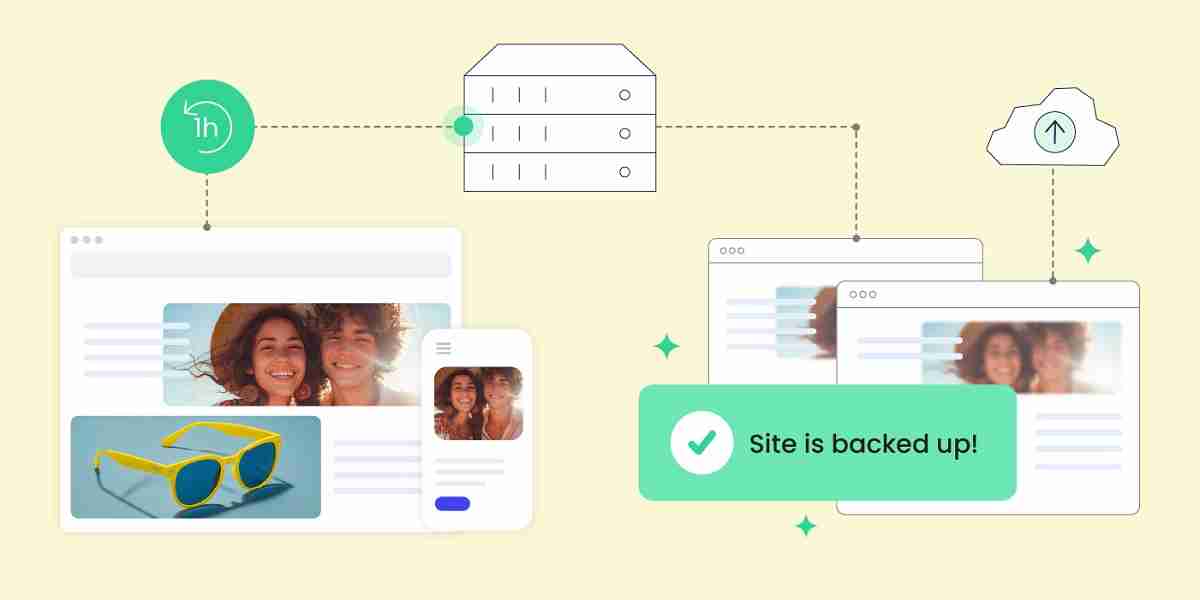
In our case, our hosting provides us with a backup daily , so that, in case of problems, we can always go back to the previous day, losing only the work of the current day. It is advisable not to relax and, in addition, before updating plugins, themes, changing PHP version or including any additional software on our server, make an additional backup. This will allow us to react immediately to any incident that may arise. There are few minutes of caution that can save us the work done.
Siteground will always keep the last 30 backups visible, being able to go back up to a month if necessary. From each stored copy we can restore files, databases and e-mails. We can also download and install them in another environment. We also have a history of restores and downloads.
Optionally, on demand (e.g. on very high-traffic sites), backups can be performed every hour.

Upgrades and maintenance
WordPress, as you know, is one of the so-called “open source” software. That is, when we work in WordPress, we can modify the source code of the application. Thus, in this way, WordPress has risen to number 1 in the world CMS (Content Management Systems) software.
Periodically, by applying new features, rectifying errors or applying security patches in the event of vulnerabilities, WordPress is updated. This task is VERY IMPORTANT and it is necessary that you follow the update instructions that, periodically, WordPress will leave on your website to keep it always, always, UPDATED.
The same happens with the plugins and themes that we are using. They also make updates and require us to incorporate them into our website. It is the best way to keep everything in order, free of vulnerable elements and with the maximum possible performance.
It is convenient, just after updating our website, to visit it and check that our front-end is correct.
We would then say that, like any software, like any company, our website also needs a maintenance program. Basically, a serious maintenance program for WordPress should contemplate the following points:
– Permanent updates: As soon as possible, both of WordPress and of themes and plugins.
– Daily monitoring of the health of the site: Visualizing the messages and dealing with each warning that is presented to us.
– Monthly web performance monitoring: Using tools such as Page Speed Insights.
– Monthly SEO monitoring: Through tools such as Google Search Console or Bing WebMasters.
– Monthly traffic monitoring: Through tools such as Google Analytics.
Optimization and performance
But as man does not live by bread alone and, to close the circumference, we need to take action to optimize the performance of our website and provide our users with the best browsing experience. This is a long-distance race and requires that we prepare our website, from the beginning, in healthy practices, application of media and appropriate software for its proper functioning.
As in SEO, a good WordPress optimization is best achieved through a good plugin. At first, without a doubt, I put myself in the hands of WP Rocket. This cache, CSS, and image optimization plugin is one of the most widely used and achieves very good loading times. I have even used it coexisting with Siteground’s Speed Optimizer and, although with some problems (Divi is also responsible), I have kept it until recently, when I have preferred to continue only with Siteground’s Speed Optimizer.
Siteground makes some very complete plugins. Both Security Optimizer and Speed Optimizer, apart from being complete, work perfectly. In other words, what they do, they do well, and this, in WordPress, is very interesting. I know it seems like a truism (a fictional character who is attributed with presenting the obvious in a sententious way), but as Fernando Tellado would say: “you can’t have everything”.
The fact is that, with Speed Optimizer I have achieved a good balance and, although there is room for improvement, I have decided to wait for the release of Divi 5 to see how to adjust the 3 tools (Divi, Speed Optimizer and WP Rocket).
Let’s see what settings Speed Optimizer provides us:
– Cache settings: NGINX server cache accelerator, file cache settings (preheated every 12 hours), and Memcached object cache. Smart cache flushing , manual flushing, exclusion of certain URL’s from the cache, exclusion of contents from the cache (if required) and browser-specific cache (not applied, slows down a bit). In addition, you have a tool that can check if any URL on your website is cached or not.
– Environment settings: forced HTTPs (secure connection), insecure content corrections (if presented), WordPress Heartbeat optimization, checking post editing pages every 15 seconds and your desktop and front page every 60 seconds (disabled in our case due to high consumption of server resources) and scheduled database maintenance (weekly cleaning).
– Front Page Settings: Minifying CSS files, merging CSS files, and preloading CSS files. Minimize, merge, and defer Javascript files. Minimize HTML output, optimize web fonts, preload fonts , remove static file strings, disable emojis , and external DNS preloads.
– Media Settings: image compression, WebP image usage, lazy loading media, excluding CSS from lazy loading and maximum width of images (1920 px).
– Site Performance Dashboard : Page Speed Insights checker and history.
On the side of our Siteground hosting, and optionally, we have another powerful tool to optimize the performance of our website. It involves offering our website through CDN (Content Delivery Network), which stores our website on several servers around the world to display our site from the server closest to the visitor, reducing loading times considerably.

Promotion and Marketing
Above all, at the beginning, it is necessary to propose a promotion and marketing strategy for our digital magazine. As a publication, it is about making the content known among potential readers. It is an arduous task, since it takes a long time to get a reader, much longer to get a regular reader and, how to put it, you have to do intense work to maintain assiduous readers, increase their number and not lose already consolidated readers.
To perform this task we use the following tools:
- Digital marketing: Creating a newsletter that periodically informs of our news by sending e-mails.
- Social Media: Publishing on each Social Network all our articles, events, products and projects.
- Online advertising: It is also possible to promote the publication by means of online ads, advertising campaigns carried out, for example, with Google Ads.
- Data measurement and analysis tools: Google Analytics, Google Adsense and Brevo, provide us with very relevant data on visits, interactions, email openings, etc…

Digital Marketing Strategies
Through this tool, readers can subscribe to a newsletter that will periodically inform them of the latest and upcoming publications, keeping our readers continuously informed of the activity of the magazine.
It is the most honest promotional channel if possible, since the subscription process is voluntary for our readers and allows its cancellation at any time. In our case, our SMTP service provider is the company Brevo, with which, every month, we send our Newsletter to our readers in Spanish and English. More information on our Email Marketing page.
With this marketing tool we announce, on a monthly basis, the news of our digital magazine. It contains an excerpt, images and texts to link to our publications. We also promote categories, labels, products and projects. At the end of the newsletter we always announce one of the upcoming posts that we are already working on.
It is a promotion with a name and surname, since we know who it is aimed at, when the email is opened, which publications have been interested and how many interactions have been made. It is undoubtedly an extraordinary reference of the level of acceptance of a publication.

Use of Social Media and Content Marketing
The publication of articles on Social Networks is another powerful tool that will allow us to get new readers. One of the most positive factors of this tool is its level of propagation, and, therefore, the ability to expand our range of possibilities.
Nowadays, almost everyone has one or more Social Networks with which to interact with family, friends, co-workers, clients, etc… Being present on one of these Social Networks will allow us to have the possibility of being read. We don’t know, in principle, by whom, but, as a good friend of mine would say: it can be the beginning of a great relationship.
As a tool for promoting a brand or publication, a presence on social networks today is essential. And it is because the world of the internet is going much faster than we imagine, and we must be, at all times, present and attentive to the events that surround us.
Our presence on Social Networks is defined in X (Twitter), Facebook, LinkedIn, Instagram, Pinterest, Tumblr, Youtube and also in the RSS feed. Every time we publish a new article, an event, or a new product or project, we spread it on each of our Social Networks. It’s part of our overall content outreach strategy.
The week after the publication of the content, we rebroadcast it, since the reader of this type of publication sometimes needs a “little push” to encourage its reading. As a general rule, we publish in Spanish and English, to cover our international vocation. In the near future, we will share the most outstanding or updated articles again.

Online Advertising
Another line to follow to promote a digital publication is to hire an ad campaign. Normally, since we are referring to an internet publication, the advertising we would hire would be through banners on other websites. However, the concept works equally well for advertising videos on the internet, TV ads, radio ads, press or billboards.
On the internet, given the weight of Google Ads, it is difficult to escape the temptation to promote yourself online on the aforementioned platform. However, this type of online advertising (SEM) is implemented in large companies that have high promotion and marketing budgets for their products. In our case, with much more modest budgets, it has a much smaller field of application.
The operation of this type of campaign is based on contracting budgets based on CPC (Cost Per Click), CPM (Cost per thousand impressions), CPL (Cost per Lead), CPA (Cost per Action or Acquisition) and Fixed Price.

Traffic measurement and data analysis
The tool par excellence to verify how our website behaves is Google Analytics 4. With Analytics 4 we will obtain data on our traffic, its origin, its behavior and we will be able to establish trends and observe the behavior of each page. Complemented with this tool, Google Search Console is very useful, which will help us in our SEO positioning by answering many questions that we constantly ask ourselves.
The use of these tools does not prevent us from also monitoring our website traffic and comparing both results. Normally, the most reliable figures are those of our hosting, since it reliably scrutinizes any visit to our website. Google Analytics 4 discards traffic, recurring IPs, several users from the same IP, small interactions, etc…
On the other hand, in Email Marketing campaigns we also have tools to analyze the behavior of our campaigns, providing us with data on opening, and reading of emails, interaction and conversions.
Final Assessment
We have reached the last chapter, in which we are going to make a small review of all the content of this exciting article dedicated to seeing how I have made “encyclobjects.com”. The title of this article already indicates where I started from, although, just by reading it, you will be able to find out how far I have come. A truly exciting adventure. Do you want to know my final assessment?
Lessons learned and future
What have I learned? Phew, a lot of things. I started at the end of 2021 with this project. It took me all of 2022 to start developing it and it was only in October 2023 that I published the magazine. Have no doubt that, in these almost 3 years, I have learned a lot, a lot.
My problem is that I was starting from scratch. I didn’t know WordPress, HTML5, CSS, JavaScript, PHP or many other things. Even so, armed with courage and time (yes) I started by registering the domain encyclobjects.com.
I have to confess that the beginnings were hard, very hard. Long hours of reading, studying, tests, consultations…, come on, non-stop. There were times when I said, “This is too much for me,” but, I don’t know how to explain it, he always answered me with the same phrase , “Nothing is impossible,” and he kept going.
The beginnings were a bit anarchic, I looked at the design, the first purposes, the technical, legal and formal requirements that had to be met, in short, a puzzle just out of the bag. Over time, I learned many things: analyzing, prioritizing, making schemes, developing routines, increasing patience, reading slowly, trying again and again, etc… I became, unintentionally, the student I never was, with a good attitude, methodical, rigorous and empathetic.
In this way I learned to be better, a better student, a better professional and…, I don’t want to hide it…, a better person. Yes, I banished vehemence, arrogance , and discouragement and exchanged them for knowledge, attention , and self-esteem. Thanks to these changes, among others, I have come this far.
In short: attitude, empathy, method and rigor.
The future? As my father said, he will come tomorrow, it is something unattainable today but we will be able to achieve something later, it depends on what we have planned. That’s why, in this project, I always established medium and long-term plans (I’ve never been in a hurry), knowing my limitations (intellectual and economic) and evaluating the chances of success.
What I set out to do at the beginning I have fulfilled: I do what I like and I disseminate my articles to anyone who wants to read them. I am not a slave to anyone, I do not obey economic, political or social criteria. I do not belong to any current or business group and I express my ideas with absolute freedom. The future? I intend to keep it that way: publish the content I like, cover the costs of the magazine as much as possible and be useful to my readers. They will decide the place I should occupy, simple as that.
Reflecting on Challenges and Successes
Challenges? Phew… Not to be repetitive, but many. From learning WordPress to carrying out a solo project. Challenge after challenge I have been turning screens, improving day by day. Although I have been alone, my solitude has not been complete, I have had some important help. First of all, I have to confess that the WordPress community is awesome, supportive, kind and sincere. Looking for a solution to any problem and always finding help is very rewarding.
I’ve faced hosting, content, spam, SEO, GDPR compliance (Good God!), Woocommerce, caches, 404 errors, bots and I don’t know how many other things… I have not won all the battles although I have come out alive from all of them… The war? I’m not in any war.
Although there are many challenges, I have listed only those that have given me the most headaches, although the most important and the one I face every day is the content. What am I going to tell? How am I going to tell it? Who? The Content Challenge , in a publication like encyclobjects.com, never ends. Every month you will face an audience that expects the best from you. You cannot disappoint and, therefore, you have to offer, every month, the best of yourself. It’s that simple (again).
Success is ephemeral since you have to renew it month by month, for this you have tools that will tell you how successful you are, if you have it. For me, seeing my audiences grow month by month gives me a lot of satisfaction and gives me energy to continue. If that’s success, I like success.

Tips for future projects in WordPress
The advice is easy to give, but hard to follow. The image in this epigraph is a camera, the best example to see authentic reality since its images are always true. Take pictures of how your project is evolving, you will see not only the passage of time, but also the progress.
Based on my experience of these almost 3 years, I would offer, to whom I would like to value, the following ideas:
- Find a partner, if possible with financial support. Loneliness in company is more bearable.
- Look for a niche market that is not too hackneyed, that you dominate and that you like. (Searching for less required keywords can help.)
- Start slowly with the use of just the right resources for the beginnings, be an ant. (It is not done in a week and compare the experience is expensive).
- Quality hosting with a proper plan (it doesn’t have to be the most expensive but it has to be good).
- Plan, study, compare, create a method, perform routines and establish “feasible” objectives with the possibility of going back.
- Consult everything you don’t know, you will always get help and almost always for free.
- Deliver the best of yourself to your readers (quality, truthful and accessible content).
- Work, work well and constantly, don’t give up, this is a marathon.

Future plans and development of encyclobjects
I have some things in mind that I want to incorporate in the future into the magazine encyclobjects.com. I would differentiate them according to the period of time in which I intend to incorporate them, thus obtaining short, medium and long-term plans. Here are some of them:
- Short term: Cloudfare WAF and performance, SEO improvements with revision in Google Search Console, Google Merchant Center (some already implemented, others in the process of implementation).
- Medium term: Affiliate products, Direct Advertising.
- Long Term: Cloud Hosting

Overview of the complete encyclobjects.com creation process
One of the things you learn quickly when you publish an article in WordPress is how to set up a table of contents, summary, indexes, or whatever you want to call it. In addition to making it easier for Google to locate content, you improve the user experience by allowing readers to quickly locate the content they are looking for.
It is the most effective summary, and since we get it automatically thanks to Easy Table of Contents , you can display it below the featured image of this article. This table of contents or index is the best summary of this extraordinary but long article.

Thanks
“Gratitude is the memory of the heart”, with this beautiful phrase from Lao Tzu (founder of Taoism), I want to emphasize that, without the help of many people, this project would not be with you today. I’m going to forget many names and surnames, but although not all of them are there, there are many more that are also (ell@s you know) in my heart. Therefore, I want to express my sincere thanks to:
- The WordPress community, an example of solidarity and altruism. You will always find someone willing to give you a hand. Thank you chic@s!
- The Customer Services of Ionos and Siteground have stoically endured each and every one of my queries. Thank you so much for your endless patience!
- The Elegant Themes Support Service, which has quickly come to my aid in any situation. Super thanks!
- The Help Services of all the plugins I use, which have always responded to any queries or concerns I have made to them. Thank you, we continue to work together!
- To Lidia, Delia and Fernando Tellado (ayudawp.com) who are in charge of the maintenance of encyclobjects.com, they allow me to write much more calmly and help me every day. You are loved!
- To my family (Nuria, Mom and Oscar) who never abandon me and support me in difficult times. How much I love you!
- To my Father, fire of which I am only a spark and who has always inspired me with his wisdom and good work. How much I miss you!
I do not forget you, my readers, many of them friends, others acquaintances and others, many more, unknown to me. Thank you all , thank you, thank you very much for joining me on this adventure.
NOTE: If you liked this article, you can share it on social media. You can also rate it with stars below. If you want to leave a comment, ask a question or make any suggestions, you can do so in the comments box below. Thank you for your attention!
Information, bibliography and media
We use our own media and other media with the availability allowed by current legislation and free access to the World Wide Web. (See Terms and conditions).
Texts: Our own, based on information from Elegant Themes, Siteground, WordPress.org, Wikipedia.
Images: Elegant Themes, Siteground, WordPress.org, Wikipedia.
Videos: s/n.

Hiya very nice website!! Man .. Beautiful .. Superb ..
I’ll bookmark your website and take the feeds additionally?
I am satisfied to find numerous helpful information here in the submit, we’d like
work out more techniques on this regard,
thank you for sharing. . . . . .